Roles and Access
Purpose
What each kind of user does, and which menus they are expected to see. Use it to find your own starting point, or to work out who should be looking at something.
Before you start
- You have the right account for this screen (see Permissions and Access).
- The date and record you are working on are correct.
- Words you do not know are in the Glossary.
Access
Setting → Menu Management
Screen
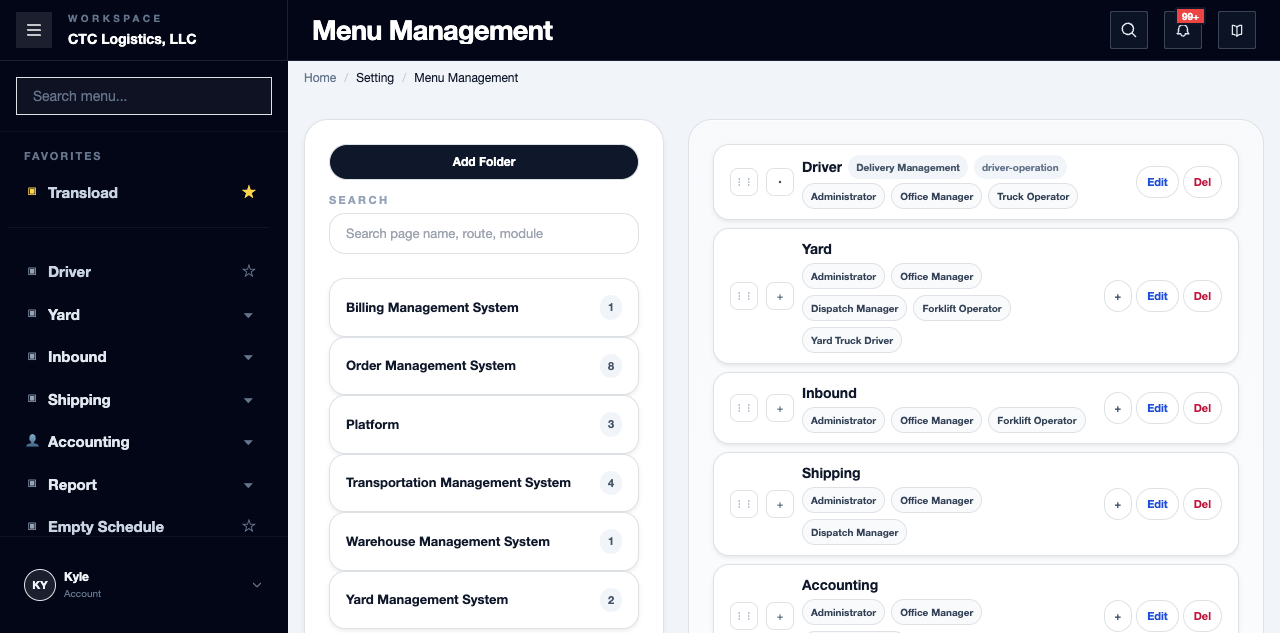
Role-based menu groups, per user type. The
No screenshot of this screen yet. Ask your office lead to capture the Booking list and the booking detail, then attach them here.
Steps
Find Your Starting Point
| User type | Start here | What they are responsible for |
|---|---|---|
| Administrator | Setting > Menu Management, reports |
Setup, access, exceptions, reporting |
| Office Manager | Shipping, Yard > Appointment, Inbound > 1. Planning, Accounting |
Appointment, planning and billing coordination; partial yard and driver hand-off review |
| Dispatch Manager | Yard > Appointment, Yard > Yard Map, Yard > Yard Dispatch, Shipping |
Yard queue and location coordination, appointment visibility, delivery follow-up |
| Forklift Operator | Inbound > 3. Loader |
Assigned loading, unloading, transload and reload work |
| Truck Operator | Driver |
Assigned pickup and drop-off, evidence, parking and arrival actions |
| Yard Truck Driver | Yard > Yard Instruction |
Assigned yard moves and confirming where things physically are |
| Warehouse Label Printer | Label Print |
Warehouse label review and printing |
Fields
| Field | What it means |
|---|---|
| Role | The kind of user |
| Menu | Where that role works |
| Responsibility | What they are accountable for |
Status
What you see on the menu is decided by your account and role assignment — not by the screen.
A menu being visible does not mean an action is permitted, and a menu being hidden does not mean the work is nobody's.
Notes
- Actual menu visibility depends on the approved account and role configuration.
- Two people can share a role and still see different menus if their accounts differ. Check the account, not just the job title.
- If you genuinely need a menu you do not have, ask an administrator. Do not work around it by borrowing someone's account.
Related
- The working day, step by step
- Provider Credentials — administrator-only
- Errors and Recovery