CTC Inbound Assignment, Loader And Workforce Runbook
Purpose
- Status:
SOURCE-RECONCILED OPERATOR DRAFT / NOT RUNTIME-TESTED- Current compatibility process:PROC-TMS-INBOUND-PLANNING- Source-reconciled capability boundaries: - Office Planning And Assignment - Loader Job Execution - Loader Workforce Time And Break - Telegram / QuickBo
Who does this
Whoever owns this job.
Before you start
- You have the right account (see Permissions and Access).
- The record and date you are working on are correct.
-
Words you do not know are in the Glossary.
-
Status:
SOURCE-RECONCILED OPERATOR DRAFT / NOT RUNTIME-TESTED - Current compatibility process:
PROC-TMS-INBOUND-PLANNING - Source-reconciled capability boundaries:
- Office Planning And Assignment
- Loader Job Execution
- Loader Workforce Time And Break
- Telegram / QuickBooks Time external effects
- Source-inspection baseline:
4fc2f5a893765fbb95e0a2bdcb971322b0ec9fc0 - Primary audiences: Office Manager / Dispatch / Forklift Operator / Manager reviewing time
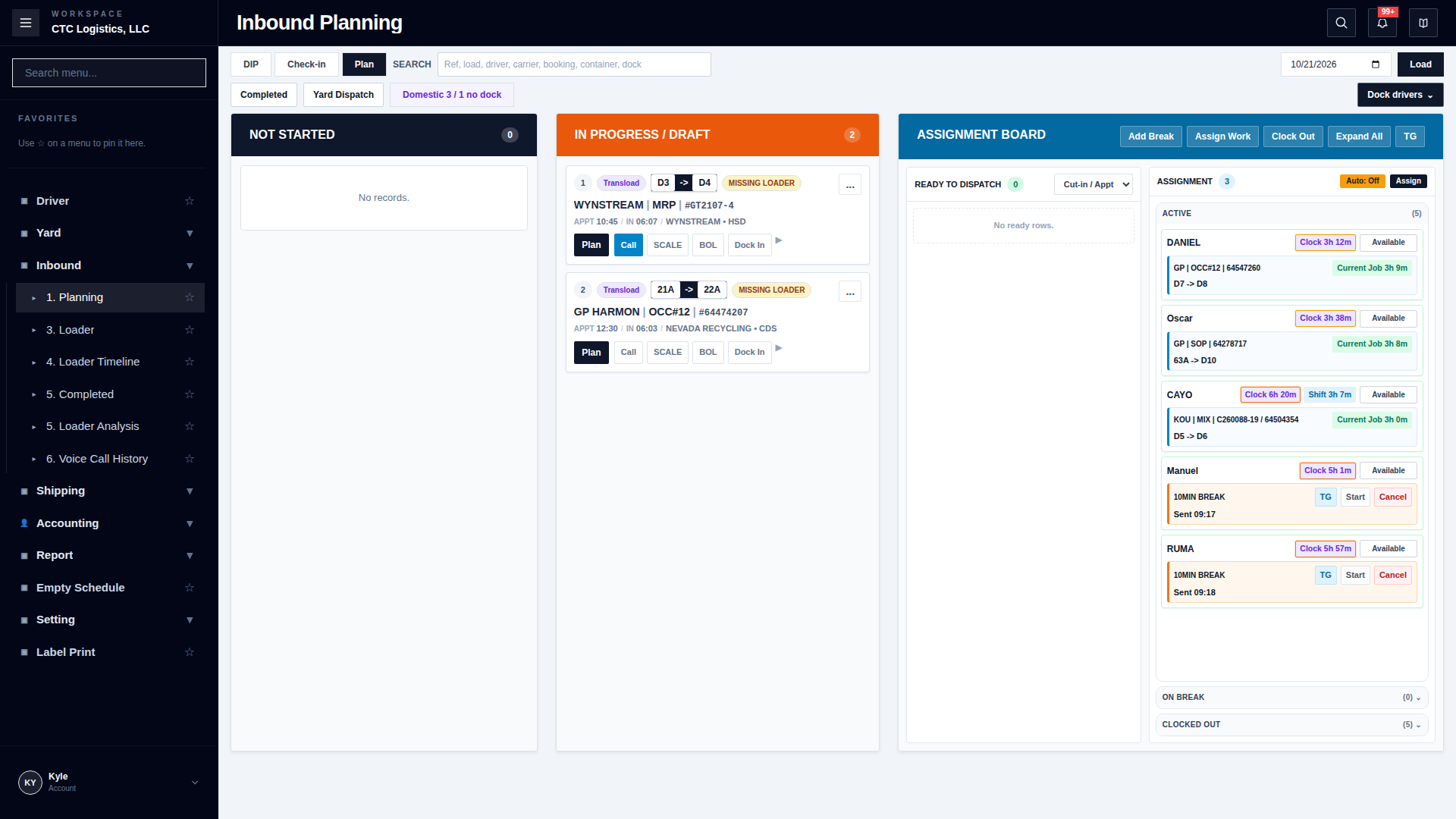
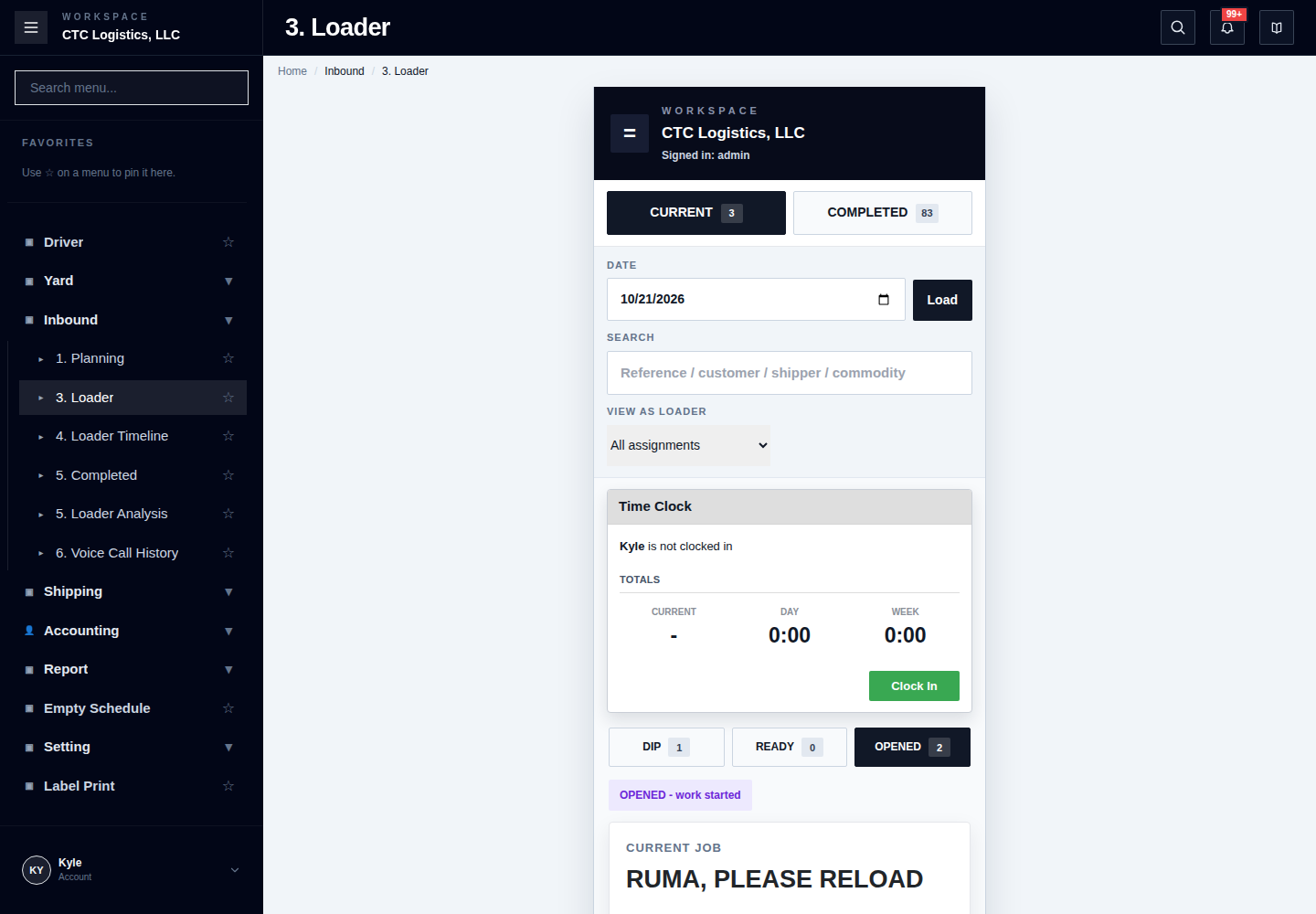
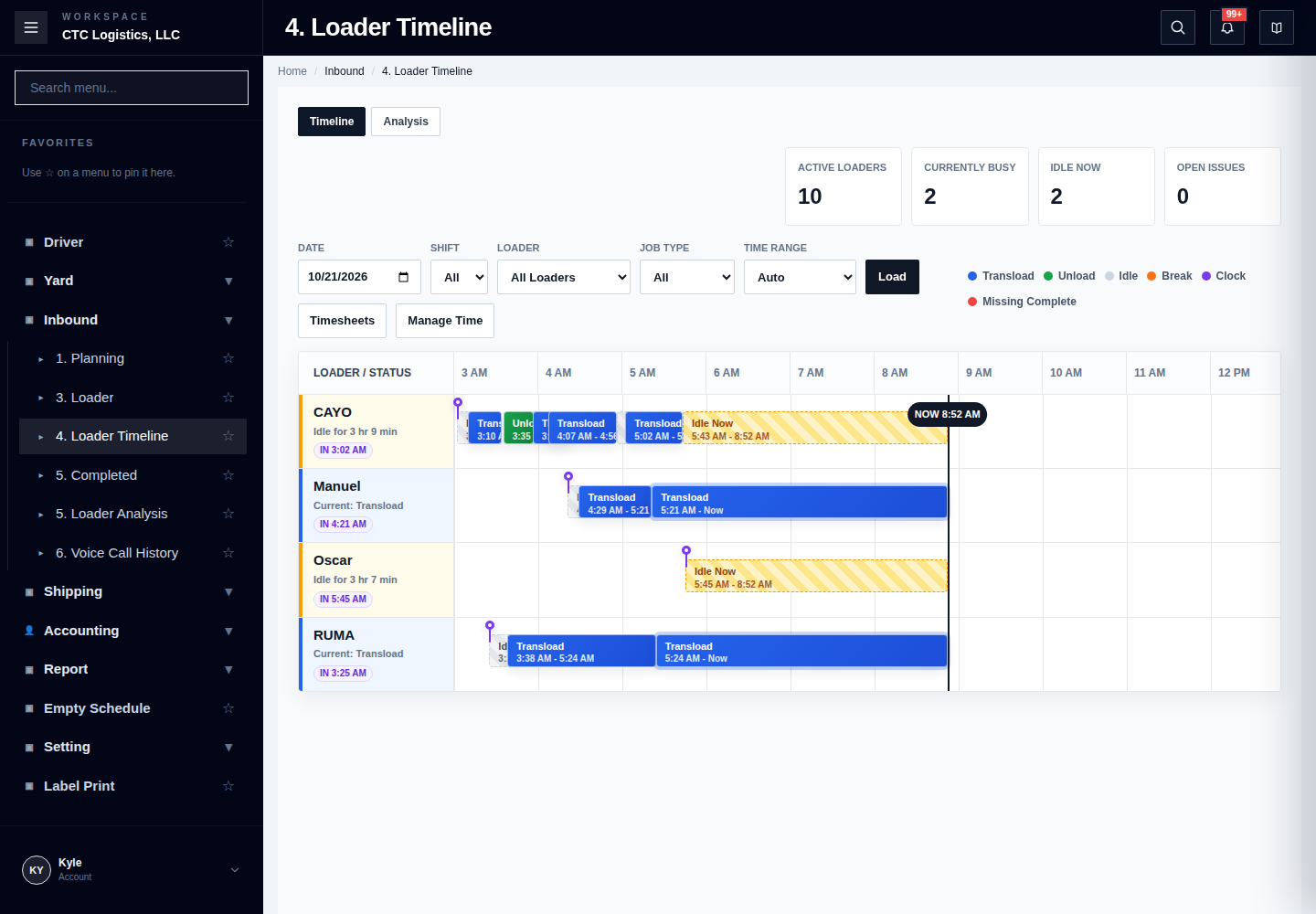
- Current pages: Inbound Planning, embedded Assignment Board, Inbound Loader, Loader Timeline
- Runtime test:
NOT PERFORMED - Target-role test:
NOT PERFORMED - Production verification:
NOT PERFORMED - Related:
1. Purpose
Use this runbook to separate four operational checkpoints that currently appear together in the Inbound workflow:
Office plan and assign work
!= Loader accepts/starts physical work
!= Loader completes work
!= Clock/Break/provider time records agree
The same T_LOADING_PLANNER row currently carries planning, assignment, runtime and some Break compatibility fields. This does not mean those responsibilities should be treated as one target process.
2. Role Responsibility
| Role | Normal responsibility | Recovery/override boundary |
|---|---|---|
| Office Manager / Dispatch | Plan work, assign Loader(s), order queue, review Telegram result and reconcile completed/handoff state. | May perform only approved Office recovery; page visibility is not proof of every API command. |
| Forklift Operator | Use personal Loader page, Clock In, start assigned work, record completion evidence and complete the physical job. | Must not act on another Loader's work merely because it is visible. |
| Manager / Administrator | Review Loader Timeline, correct staff-time evidence with reason, coordinate stuck/partial work. | Correction must not erase immutable job history or silently fabricate work. |
| Provider owner | Reconcile Telegram and QuickBooks Time when local state and external state differ. | Provider success/failure does not replace local process authority. |
3. Daily Start Checklist
Office
- select the intended operating date;
- confirm scheduled/check-in/plan rows match the physical workload;
- identify missing booking, equipment, dock, warehouse location or Loader requirements;
- verify Loader roster and current shift availability;
- review active/opened jobs before assigning more work;
- review unresolved Break, Clock and Telegram exceptions from the prior shift.
Loader
- sign in with personal account;
- confirm displayed Loader identity;
- select today's operating date;
- review Time Clock state;
- Clock In before normal work start;
- confirm Current/Ready/Open/Completed views show expected personal work;
- stop when another person's work or unexpected admin-wide data appears.
4. Office Planning And Assignment
4.1 Plan readiness
Before assignment, verify:
- correct transload/work identity;
- current status and planner ID;
- work type: Unload, Transload, Reload or approved other path;
- dock/from/to location;
- required equipment/container;
- customer and commodity;
- required booking or pickup linkage;
- work is not already terminal or assigned under another active planner;
- no unresolved Yard blocker when the process depends on Yard preparation.
4.2 Assign one Loader
- open the embedded Assignment Board;
- confirm the row is in the Ready list;
- confirm the intended Loader is working/available under current operation;
- drag/select the row for that Loader;
- submit assignment once;
- reread planner assignment and queue order;
- review Telegram result separately;
- confirm the work appears on the intended Loader page.
sequenceDiagram
    autonumber
    actor Office
    participant Board
    participant API
    database DB
    participant Telegram
    actor Loader

    Office->>Board: Assign Ready row to Loader
    Board->>API: Save assignment
    API->>DB: Commit planner Loader and queue fields
    DB-->>Board: Assignment readback
    API-->>Telegram: Optional first/next assignment message
    alt Provider succeeds
        Telegram-->>Board: Sent
    else Provider fails or is uncertain
        Telegram-->>Board: Assignment committed; message unresolved
    end
    Board-->>Loader: Work visible after personal Loader-page refresh
4.3 Queue order
The board can show one current-like item and queued items for each Loader. Current source uses planner/job/status/time and queue-order compatibility fields.
When ordering:
- do not move an in-progress job as though it were a queued assignment;
- preserve the currently opened physical job;
- confirm every affected planner ID after reorder;
- verify two Loaders do not each interpret the same shared row as their exclusive Current job;
- refresh before making a second reorder after an error or timeout.
4.4 Multiple Loaders
Current storage can contain comma-separated Loader user IDs. The approved meaning remains unresolved.
Until policy is approved:
- treat the first/primary operational actor as requiring explicit Office confirmation;
- do not assume every listed Loader may independently Start/Complete;
- do not use multi-Loader assignment to bypass a missing primary Loader;
- record all assigned Loader IDs when escalating;
- do not migrate comma-separated storage into a target domain model unchanged.
5. Telegram Assignment Recovery
Assignment and Telegram are independent checkpoints.
assignment saved
!= Telegram delivered
Assignment saved, Telegram failed
- reread the planner and Loader page;
- if the assignment is present, do not assign again;
- use the existing Telegram retry/send action only;
- record provider error/request context;
- confirm the message result separately.
Timeout with unknown assignment result
- refresh Assignment Board;
- reread planner Loader and queue order;
- check whether the row appears for the Loader;
- check Telegram sent marker/result;
- retry only the missing boundary.
Telegram sent but Loader cannot see work
Treat this as assignment/query/access inconsistency, not a notification problem.
Provide:
TRANSLOAD_ID;PLANNER_ID;- Loader user ID;
- assignment fields;
- page/date/query scope;
- Telegram timestamp/result;
- Loader account and intended role.
6. Loader Time Clock
6.1 Clock In
- confirm no unexpected open clock exists;
- select Clock In once;
- reread Time Clock as Working;
- verify current/day/week totals begin from the expected state;
- then start assigned work.
Current Start APIs do not universally prove Clock In as a server guard. This runbook treats Clock In as the required operating sequence, not as a guaranteed source invariant.
6.2 Clock Out
Clock Out currently performs a local staff-time write and can release scheduled assignments in the same transaction.
Before Clock Out:
- complete or formally hand off any opened job;
- verify no open Break remains;
- review queued assignments that may be released;
- notify Office when work remains.
Procedure:
- select Clock Out once;
- reread local Clock status;
- review released assignment count;
- Office refreshes Assignment Board;
- verify released rows returned to Ready or the intended unassigned state;
- reconcile QuickBooks Time separately when needed.
sequenceDiagram
    autonumber
    actor Loader
    participant Clock as Loader Time Clock
    participant API as Staff-Time API
    database DB
    participant Board as Assignment Board
    participant QBT as QuickBooks Time
    actor Office

    Loader->>Clock: Clock Out
    Clock->>API: POST local CLOCK_OUT
    API->>DB: Begin transaction
    API->>DB: Insert local event
    API->>DB: Release eligible SCHEDULED assignments
    API->>DB: Commit
    API-->>Clock: Event + released count
    API-->>QBT: Post-commit sync
    Office->>Board: Refresh released work
    Board-->>Office: Ready/unassigned readback
    Note over Clock,QBT: QuickBooks Time failure does not erase local Clock Out.
Current policy questions
- whether active job blocks Clock Out;
- whether open Break blocks Clock Out;
- whether Loader must confirm a release preview;
- who owns immediate reassignment;
- how external time divergence is shown.
Do not invent answers in user instructions until approved.
7. Loader Current / Ready / Opened / Completed
CURRENT / READY
Expected:
- intended assigned work;
- correct dock/container/location;
- no conflicting opened work;
- queue order consistent with Office board.
OPENED
Expected:
- work status is Transloading or Unloading, or planner runtime evidence indicates Start;
- current actor and planner identify the intended job;
- Start is not offered as a second normal action.
COMPLETED
Expected:
- terminal work status;
- planner job end/finished result;
- completion data/evidence visible;
- next Final Review/Inventory/Yard handoff identified.
A row appearing under Completed does not prove staff-time JOB_END, Telegram, inventory reconciliation, Final Review or Yard work completed.
8. Start Work
Preconditions
- personal Loader account;
- intended work assigned to that Loader under current policy;
- correct planner/transload ID;
- no other opened work unless approved multi-work policy exists;
- physical item and dock/container/location match;
- required loading equipment exists;
- normal Clock In sequence completed;
- no active Break.
Procedure
- open Current/Ready row;
- compare full instruction;
- confirm container/location/quantity as required;
- select Start once;
- reread row under Opened;
- verify planner/runtime state and Timeline when necessary;
- do not repeat Start after timeout until exact reread.
sequenceDiagram
    autonumber
    actor Loader
    participant Page as Loader Page
    participant API
    database DB
    participant Timeline as Staff-Time / Timeline

    Loader->>Page: Confirm assigned instruction
    Page->>API: Start work
    API->>DB: Transactionally update work and planner STARTED
    API->>Timeline: Append JOB_START
    DB-->>API: Committed Start
    API-->>Page: Opened result
    Page->>API: Refresh personal work
    API->>DB: Read exact current state
    DB-->>Page: OPENED readback
Start timeout
Reread:
- work status;
- planner job status/start time/accepted user;
- staff JOB_START;
- personal Loader page.
If Start committed, continue. If no state changed, retry only Start. If records disagree, stop and escalate.
9. Complete Work
Transload/Reload completion
Verify applicable fields/evidence:
- physical work is finished;
- final bale quantity;
- inbound/final weight where required;
- final container/equipment;
- seal number;
- required photos and completion details;
- no unresolved physical exception.
Unload completion
Verify:
- inbound final quantity/weight where applicable;
- actual warehouse location;
- physical placement;
- no conflicting existing lot/location state;
- next inventory/warehouse handoff.
Procedure
- open the in-progress job;
- enter actual final data;
- review before submission;
- submit Complete once;
- preserve any already-uploaded evidence;
- reread terminal work and planner state;
- review Timeline JOB_END separately;
- identify downstream review/inventory/Yard work.
sequenceDiagram
    autonumber
    actor Loader
    participant Page
    participant API
    database DB
    participant Staff as Staff-Time
    participant Effects as Telegram / Operation Event
    actor Office

    Loader->>Page: Submit actual completion data
    Page->>API: Complete work
    API->>DB: Begin transaction
    API->>DB: Commit terminal work/planner/equipment data
    API->>Staff: Attempt JOB_END
    API->>DB: Commit
    API-->>Effects: Post-commit effects
    API-->>Page: Completion response
    Loader-->>Office: Handoff completed work identity
    Office->>API: Reread completion and downstream queues
Completion timeout
Do not:
- upload the same photos again without checking;
- repeat physical equipment/location action;
- create another planner;
- issue Complete repeatedly.
Reread work, planner, evidence, equipment/location, Timeline and downstream queue. Continue only the missing boundary.
10. Undo
Current documented intended behavior is a pre-start restoration with immutable history retained. Terminal completion Undo is not an approved ordinary path.
Use Undo only under current authorized workflow and evidence review.
Required checks:
- work is in the supported active source state;
- physical work has not already reached terminal completion;
- original planner ID is known;
- equipment/location and staff event effects are understood;
- Office is coordinating the rollback.
After Undo verify:
- main work returned to expected pre-start state;
- planner is SCHEDULED;
- accepted user and runtime start/end fields are restored as designed;
- immutable JOB_START and compensation evidence remain traceable;
- the same assigned Ready row is reusable;
- no terminal Inventory/Yard side effect remains unexplained.
Undo is not a generic repair command and must not be used to hide completed work.
11. Break Queue
11.1 Office creates Break/Lunch
- verify Loader identity and current queue;
- choose Break type;
- choose intended position (
after-current, queue end or approved current handling); - create once;
- send Break Telegram;
- verify local Break queue row and notification result;
- Loader refreshes personal page.
Current source stores Break as a compatibility planner row. Do not describe it as a physical loading job.
11.2 Loader starts Break
Current self-service expects:
- assigned Loader identity;
- scheduled Break;
- no existing start;
- current/notification readiness;
- intended operating date.
Procedure:
- confirm Break/Lunch label;
- select Start once;
- reread Time Clock as On Break;
- verify local BREAK_IN;
- do not manually start another Break.
11.3 Break end/expiry
Current source can close expired Breaks from maintenance/read-adjacent paths and may create/repair BREAK_OUT plus next notification.
Operationally:
- Loader/Office must verify the Break actually ended;
- local BREAK_OUT and queue completion must agree;
- next work Telegram is a separate result;
- QuickBooks Time is reconciled separately;
- unexpected auto-close is escalated with Break queue ID and timestamps.
sequenceDiagram
    autonumber
    actor Office
    participant Break as Break Queue
    participant TG as Telegram
    actor Loader
    participant Staff as Staff-Time
    participant Expiry as Current Expiry Caller
    participant QBT as QuickBooks Time

    Office->>Break: Create scheduled Break/Lunch
    Break-->>TG: Send notification
    TG-->>Break: Sent / failed / unknown
    Loader->>Break: Start assigned Break
    Break->>Staff: Write BREAK_IN
    Staff-->>QBT: External sync after local commit
    Expiry->>Break: Detect elapsed Break
    Expiry->>Staff: Write/repair BREAK_OUT
    Expiry-->>TG: Optional next-job notification
    Note over Break,QBT: TARGET requires one deterministic expiry owner.
Telegram failure
If Break exists but message failed:
- do not create a duplicate Break;
- resend only notification after reread;
- Loader does not start an unrecognized Break merely because Office expects it;
- use manual communication only under current supervisor policy and record it.
12. Loader Timeline And Manager Corrections
Timeline reads staff events and joins planner context. It is not a replacement for work state.
Manager correction rules:
- use personal manager account;
- identify exact staff user and event;
- provide a specific reason;
- preserve immutable job history;
- correct only Clock/Break fields supported by current commands;
- reread current/day/week totals;
- reconcile QuickBooks Time independently;
- do not delete events to hide a partial job or queue problem.
When work state and Timeline disagree, compare:
T_TRANSLOAD
T_LOADING_PLANNER
T_STAFF_TIME_EVENT
personal Loader page
Assignment Board
physical work result
13. QuickBooks Time
Local staff-time is the current source of truth for CTC. QuickBooks Time sync is an external effect.
local event committed
!= QuickBooks Time synchronized
When sync fails or is skipped:
- preserve local event;
- record staff user, event ID/type/time and sync status;
- verify user mapping/config if authorized;
- reconcile external state without repeating the local event;
- use manager correction/sync procedure only with reason and readback.
Do not expose secrets/tokens in operational notes.
14. Required Readback By Action
| Action | Required readback |
|---|---|
| Plan Save | planner ID, fields, work status, no duplicate active planner |
| Assign | planner ID, assigned Loader IDs, queue order, Loader-page visibility |
| Telegram | local assignment plus provider result/last sent marker |
| Reorder | every affected planner's order and current job preserved |
| Clock In | local event, Working state, totals |
| Clock Out | local event, released assignment count, board state, external sync separately |
| Start | work status, planner STARTED, accepted actor, JOB_START when present |
| Complete | terminal work, planner FINISHED/end time, evidence, JOB_END separately, downstream handoff |
| Break create | Break queue ID/type/position/Loader, notification result |
| Break start | conditional STARTED state and local BREAK_IN |
| Break end | FINISHED/ended queue, BREAK_OUT, totals, external sync separately |
| Undo | restored work/planner state plus retained audit/history |
15. Escalation Evidence
Provide:
environment / CLIENT_ID
account and intended role
operating date
TRANSLOAD_ID / PLANNER_ID / Break queue ID / Staff event ID
Loader user ID and displayed identity
work type / reference / dock / equipment
board lane and queue order
work status and planner job status
Clock/Break current state
Telegram and QuickBooks Time checkpoint
requested action and timestamp
response/error/request ID
exact reread from Board, Loader and Timeline
physical state and downstream queue
16. Future Test Matrix
| Scenario | Required evidence | State |
|---|---|---|
| single Loader assign | Office + Loader personal accounts, planner/board/page readback | NOT TESTED BY THIS SLICE |
| multi-Loader semantics | approved primary/support policy | NOT APPROVED / NOT TESTED |
| assignment Telegram failure | assignment remains; resend only notification | NOT TESTED |
| duplicate/concurrent assign | one intended assignment/order | NOT TESTED |
| personal Loader Start | assigned actor enforced | NOT TESTED |
| wrong Loader Start | denied without mutation | NOT TESTED |
| Start timeout | exact reread/no duplicate JOB_START | NOT TESTED |
| Complete with evidence | terminal state and downstream handoff | NOT TESTED |
| Complete partial staff event | business completion retained and Timeline discrepancy visible | NOT TESTED |
| Clock Out release | local event + assignment release one transaction | NOT TESTED |
| active-job/open-Break Clock Out | approved policy | DECISION REQUIRED |
| Break create/send/start/end | local/provider/time checkpoints | NOT TESTED |
| Break expiry | one owner, no duplicate BREAK_OUT/next Telegram | NOT TESTED |
| Undo | pre-start restoration plus retained history | NOT TESTED |
| QuickBooks Time failure | local source preserved and reconcilable | NOT TESTED |
| Client 1 roles | role/page/API matrix | NOT TESTED |
| Client 2 applicability | explicit process/profile decision | UNKNOWN |
17. No-Go Rules
Do not:
- assign again only to resend Telegram;
- treat multi-Loader tokens as approved shared authority;
- start another Loader's work;
- repeat Start/Complete before reread;
- clock out to hide active/unresolved work;
- create duplicate Breaks after notification failure;
- treat Break planner rows as normal loading jobs;
- let ordinary read refresh become the target expiry writer;
- repeat local staff event to repair QuickBooks Time;
- delete staff/job evidence without an approved correction path;
- claim field readiness from source inspection;
- broaden Client 1/2 roles without P2-007 evidence.
---
Source:
docs/runbooks/CTC_INBOUND_ASSIGNMENT_LOADER_WORKFORCE_RUNBOOK.md— ctc repository · This page is an English translation of the source document. Identifiers, file paths and code symbols are unchanged.